
Next AI Draw.io review for editable architecture diagrams
A reproducible check of Next AI Draw.io MCP 0.4.11 covering creation, atomic edits and drawio, PNG and SVG output, with browser dependencies and deployment tradeoffs.
AgentIndex · Published 2026-11-04 · Updated 2026-11-04
Next AI Draw.io is worth evaluating when a coding agent can explain a project, but the resulting architecture diagram must remain useful after the conversation ends. Its draw.io canvas gives people a place to rename nodes, adjust relationships and hand an editable file to another engineer.
The useful adoption question is whether that editing loop holds together. Can an agent change one node, recover from a rejected edit and deliver a file that another person can maintain? Our pinned-version check completed that loop for a small, deterministic diagram. Natural-language interpretation and the correctness of a larger architecture still depend on the model, source material and review process.
What we ran
On 2026-11-04, we ran @next-ai-drawio/[email protected] over stdio with MCP TypeScript client 2.4.0, Node.js 26.6.0 and an isolated Chrome 156 profile. The package served its bundled draw.io editor. The web application, desktop application and MCP package have separate release entries; these results apply to the named MCP package.
We supplied XML ourselves. No paid model generated the diagram, and the browser had no personal profile or login. This checks editing and export behavior, rather than a model's ability to infer a complex system from a prompt.
Creation, rejection and export results
The input had two rectangles, Browser and API, connected by an HTTPS arrow. We then changed API to API v2.
| Check | Observed result |
|---|---|
| Initialization and discovery | Connected and listed 16 tools |
| Create from compact XML | Two shapes and one connector |
| Submit a valid update together with an invalid deletion | Entire edit rejected; Browser kept its original label |
| Update the API node separately | Label changed to API v2 |
Export .drawio | Parseable XML retaining two vertices and one edge |
| Request a rendered screenshot | Returned a 452 × 102 PNG |
| Export SVG | Created an SVG containing the updated label |
| Access the preview API without its token | HTTP 403 |
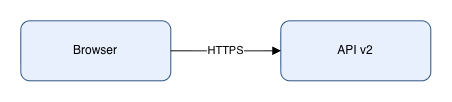
The mixed edit is particularly useful evidence. One operation would have changed a real node; the other tried to delete a missing cell. Reading the diagram afterward confirmed that the valid operation had not been applied either. A caller can rebuild its request against the current document without first guessing which part succeeded. This establishes the behavior of that error combination, not every XML edge case or a concurrent editing guarantee.
The reproducible fixture includes the input, verifier, exported source file and recorded results.
The preview browser belongs in the deployment plan
The MCP process serves a local preview, while the editor in that browser renders screenshots and image exports. Starting the process alone therefore does not demonstrate a working PNG or SVG pipeline. The project's troubleshooting guidance discusses closed or unresponsive previews and background-tab timing limitations. MCP documentation
We set BROWSER=none to prevent an unsolicited browser launch, then explicitly opened the returned preview in our disposable browser before exporting images. A headless deployment needs an equally explicit answer to who launches that browser, how long it lives and how an export timeout is handled.
For collaborative documentation, keep both the editable .drawio source and the image used in the document. Check that they represent the same revision after manual changes. Our fixture checked the exported cells and connections, but did not exercise two people alternating edits.
Offline editing and model traffic are separate considerations
Bundling the editor removes a dependency on an external draw.io page during local editing and rendering. AI generation on an intranet also requires an appropriate model endpoint and a decision about which project information the coding agent may send there. Offline deployment guide
That guide documents an important output limitation: an image inserted by its external URL can appear on the canvas yet be absent from exports because the static bundled editor lacks the image proxy. Test final exports with the icons and assets your team actually uses. Our fixture contained ordinary shapes only.
For the web application's own-key workflow, distinguish storage from transport. The current chat route reads x-ai-api-key from request headers to configure model requests. A key saved in the browser can therefore still pass through the application service. The hosted demo, a self-hosted web application and a local agent calling MCP have different data paths. Chat route source
Where to start a real evaluation
Begin with a diagram your team already understands. Check services, boundaries, arrow direction and labels before judging the layout. Ask for a local edit, then have another engineer open the exported source and continue the work.
Teams that prioritize text diffs and deterministic builds should also compare their existing Mermaid workflow. Teams that mainly draw manually should include direct draw.io use as a baseline. MCP setup, the preview browser, model usage and human review all contribute to adoption cost; this check did not measure time savings or total cost against those alternatives.
Before expanding use, repeat the handoff with a frequently changing flowchart, an architecture with meaningful permission or network boundaries, and a diagram containing external assets. That evaluates the delivery problem this tool is intended to solve.
Related reviews: MCP TypeScript SDK development and migration, browser-harness browser control.
For a JSON-first handoff, see the Archify validation and offline HTML review. Its tests distinguish invalid-input preservation from a browser-stage skip after file delivery; they do not establish a speed or accuracy advantage over draw.io.