
Archify review: Validation, delivery and offline diagrams
Testing Archify 3.2.0 with 18 CLI calls and 11 browser checks: invalid candidates, provenance, offline HTML, directed routes and a late browser-gate limitation.
AgentIndex · Published 2026-11-08 · Updated 2026-11-08
Archify produced a readable, interactive workflow from our fixed JSON and delivered an HTML file that worked offline by itself. Its checks rejected our selected invalid candidates and detected a changed artifact. One operational boundary mattered: finalize could return a nonzero result for an unavailable browser after replacing the target HTML. File delivery and complete acceptance were separate events.
We tested the published 3.2.0 Skill bundle with 18 CLI invocations and 11 independent browser conditions. The reviewing assistant supplied a six-node, five-edge synthetic workflow after reading the bundled Skill. The execution scripts made no separate model requests. This is a test of rendering, validation and handoff, not a benchmark of natural-language interpretation or automatic codebase mapping.
A fixed release rather than an npm name assumption
We downloaded archify.zip from release v3.2.0. Its 5,271,959 bytes matched GitHub's published SHA-256: 70e210265c59f24dcbdf2a502ff671104b5454e7ee7d3554aecd86bad32384f5. The tag resolves to commit 208acba8d412335185b2056fedf54b3405df43fb.
Six selected files—the Skill, CLI, finalizer, workflow renderer, workflow schema and bundled LICENSE—matched that commit byte for byte. The distributed package.json differed by omitting repository-only scripts and development dependencies. We executed the release archive directly, without installing it into the user's global agent configuration or running a package lifecycle script. Pinned source
The environment was macOS 26.6.2 on Apple M1 Pro, Node.js 26.3.0 and Chrome 157.0.8103.38. The independent browser harness used Playwright 1.65.0-alpha-2026-10-30. The bundle declares Node.js 18 or newer; successful full finalization also needed the browser in this environment.
The fixtures, source fingerprints and raw results preserve the complete supplied JSON, command arguments, exit codes, receipts and output hashes. Update checks were disabled. A Node HTTP guard covered the recorded CLI run; the independent page test used an offline browser context. These controls do not establish that every browser process made no operating-system network requests.
The supplied graph passed all four automated gates
The workflow described an artificial bilingual-draft process with an acceptance branch. It used Chinese labels, meta.locale: "zh-CN", two lanes and explicit semanticChecks for roots, terminals, required edges and a required directed path. It did not describe or execute our site's deployment system.
node bin/archify.mjs finalize workflow candidate.json workflow.html --quality showcase --json
The first candidate passed validate, deliver, strict check and browser-check. Its receipt still said visualReview: "not-requested". Automated acceptance did not claim that somebody had looked at the drawing. We separately inspected four browser captures and the PNG export.
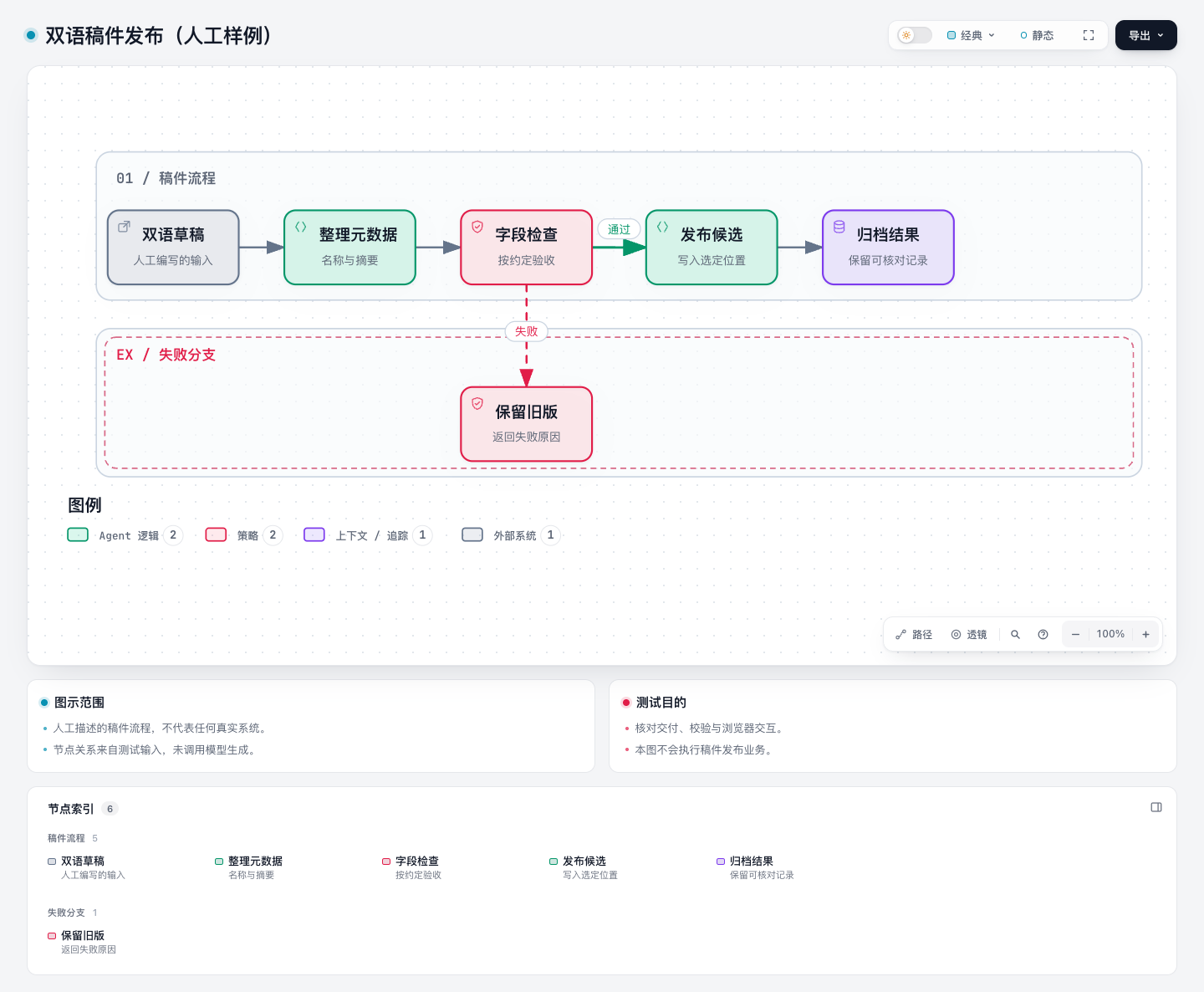
This is an actual browser capture of the supplied test graph. It is not evidence of prompt-to-diagram accuracy. The desktop view showed all six selected labels and the failure branch without observed label or arrow clipping.
Invalid input preserved the prior HTML in our cases
We modified the input, then asked finalize to use the same target path. The following six cases returned exit code 1; each left the previous HTML's SHA-256 unchanged.
| Negative input | Observed rejection |
|---|---|
| Edge pointing to an unauthored node | Structural and path checks failed |
| Duplicate node ID | Structural and path checks failed |
| Two nodes occupying the same lane and column | workflow/node-overlap |
| An explicitly required direct edge absent from the graph | workflow/required-edge |
Durable meta.output containing ../ | output/meta-path-syntax |
| Incomplete JSON | input/json-parse |
A separate deliberately incorrect expected candidate digest returned finalize/candidate-changed, also preserving the HTML. That tests the supplied-digest guard; it was not a concurrent-write or race-condition experiment.
The checks did not determine business truth. Changing the publishing node's label to “no review needed” passed our selected validation, with topology otherwise unchanged. The contracts enforce what the author encoded. They do not independently know the real approval policy or whether a system diagram accurately represents running code.
Provenance enforcement was an explicit choice
After a successful delivery, we appended an HTML comment. Strict checking returned delivery/provenance-mismatch. Restoring the exact captured bytes made the same strict check pass again. The restoration was performed by our harness, not an automatic Archify repair.
We then used the lower-level render command to create an artifact without a delivery sidecar. Ordinary check succeeded with provenance: "unknown"; adding --require-provenance failed with delivery/provenance-required.
This is useful protection against unnoticed file changes and missing delivery evidence. It is not an independent certification of the content, and a successful ordinary check should not be reported as verified delivery provenance. The bundle's normal finalize path selected strict checking for us. Delivery contract
A browser-stage skip could leave a new artifact on disk
For the late-stage negative case, we supplied a valid revised title and set ARCHIFY_CHROME to a nonexistent executable. Archify did not silently use another installed browser. The receipt reported:
| Stage | Status |
|---|---|
validate | pass |
deliver | pass |
check | pass |
browser-check | skipped |
| Overall command | ok=false, exit code 2 |
The target HTML had already changed from SHA-256 419842bf… to 3c9b0faa…. This does not contradict the earlier invalid-input result: the valid candidate had reached delivery before browser availability was checked. The observed finalizer was not a transaction that restored the old target whenever a later gate could not run.
Our next run used the real browser and a fresh evidence directory; all four gates passed again. Consumers should inspect the exit code and each gate before publishing a file merely because it exists. If preserving the accepted public artifact until every gate completes is required, use a separate candidate output and promote it only after successful finalization. We did not test crash recovery, power-loss durability or concurrent delivery.
Offline interaction and exports were exercised independently
We copied only the resulting 813,485-byte HTML into a fresh folder, with no Archify package files or delivery sidecars beside it. In an offline Chrome context, the page retained the six Chinese node labels and localized finder control. Searching for the gate selected it; its deep link restored focus.
Downstream reach from that gate selected exactly the gate plus its three authored descendants. The forward route to the archive contained the five expected nodes. The reverse route reported that the archive could not reach the draft, rather than inventing an arrow or an undirected connection. These are queries over the supplied graph, not runtime impact analysis.
While downstream focus was active, we downloaded SVG and PNG through the actual export menu. The SVG retained all six labels and omitted active reach, selection and passport elements. Focus remained selected in the live viewer after both exports. The PNG was 3576×2232 pixels and visibly retained the complete diagram. Theme switching and saved Live/Still preferences also worked in the tested context. The page recorded no HTTP requests or JavaScript page errors during this run.
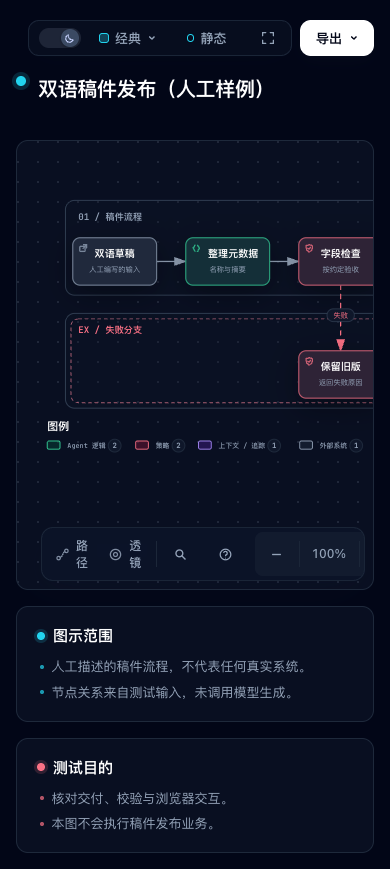
At a 390×844 viewport, the document width stayed at 390 pixels, but the graph itself was clipped inside its container at the tested 100% scale. Right-hand nodes were outside the visible area. Page containment is consequently a narrower claim than a complete mobile reading experience; the bundled runtime reference also describes narrow layouts as containment rather than a mobile product feature.
Adoption boundary
Archify is a useful pilot for teams that want reviewable JSON input, explicit validation receipts and an interactive HTML handoff. Keep authoring facts, validation, file delivery, browser acceptance and visual review as separate checks. Preserve JSON and receipts with the output when provenance matters; a portable HTML can remain readable even without those sidecars, as our copied-file test showed.
We did not test other diagram modes, explainers, repository-evidence verification, natural-language accuracy, global Skill installation, large graphs, other browsers or operating systems, WebM/share-card exports, accessibility conformance or a measured speed advantage. The bundled Skill's MIT license is recorded with the pinned archive; it is separate from the directory's current repository metadata.
See the Archify tool profile for setup and selection notes. For a different editing model, our Next AI Draw.io review checks an editable draw.io handoff; these were separate tests, not a comparative benchmark. Our FastMCP review examines another case where the caller's error result and the work already completed need separate inspection.